
Download Lunar Calendar Tool – Calendar, Date, Time, Tools, Utilities, Productivity
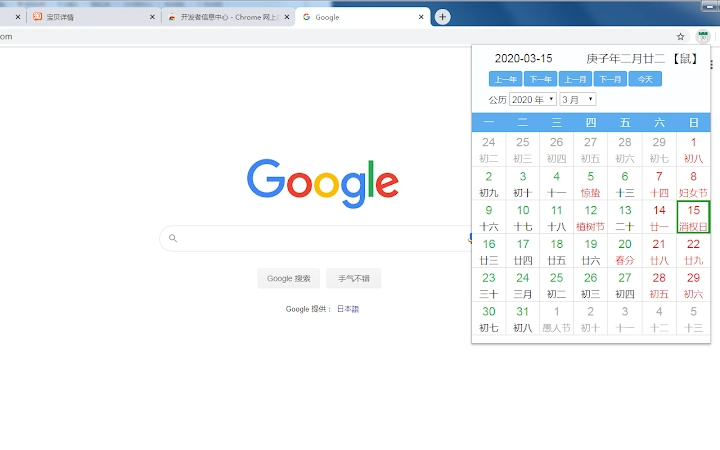
The Lunar Calendar Tool is a desktop application designed to help users easily access lunar calendar information, including traditional Chinese dates, solar terms, public holidays, and zodiac signs. It provides a simple interface for viewing important cultural and seasonal markers, making it ideal for individuals interested in traditional Chinese timekeeping. The tool supports both Windows and Mac platforms, offering seamless integration into daily routines for users who value lunar-based calendars. With the ability to display zodiac signs and Heavenly Stems and Earthly Branches when hovering over dates, it enhances the user experience for those interested in astrology, cultural heritage, or planning events around traditional dates. The application is lightweight and free to use, making it accessible for a wide audience seeking a straightforward way to reference lunar calendar data.
Key Features & Capabilities
- Lunar Calendar Display – Offers a clear visual representation of lunar dates alongside Gregorian calendar entries, enabling users to track traditional Chinese calendar days.
- Solar Term and Holiday Information – Displays key solar terms and national/public holidays, helping users plan around seasonal events and cultural observances.
- Hover-Based Zodiac & Heavenly Stems Display – When users move the mouse over a specific date, the tool reveals the corresponding zodiac animal and the Heavenly Stems and Earthly Branches year, providing deeper cultural context.
- Lightweight Desktop Application – Designed to run efficiently with minimal system resource usage, ensuring smooth performance without impacting other tasks.
- Cross-Platform Compatibility – Available for both Windows and Mac, allowing users on different operating systems to access the same functionality.
The tool is particularly useful for users who follow traditional Chinese practices, such as selecting auspicious dates for weddings, business launches, or personal milestones. It also serves as a helpful reference for educators, researchers, or content creators focusing on cultural or historical topics. The real-time hover feature adds an interactive layer, making the experience more engaging than static calendar tools.
User Interface, Workflow & Performance
The user interface is minimalistic and intuitive, focusing on clarity and ease of navigation. The main window displays a standard calendar layout with lunar dates integrated into the grid. Users can browse through months and years with simple click controls, and the layout remains consistent across sessions. Navigation is straightforward, requiring no learning curve for first-time users.
Workflow efficiency is enhanced by the interactive hover function, which allows users to quickly access detailed lunar information without opening additional menus or windows. This reduces the number of steps needed to retrieve specific data, improving overall usability.
Performance details were not specified by the developer. However, the application’s file size of 5.2 MB suggests a streamlined design optimized for low resource consumption. The developer did not provide additional system requirements, so users should expect general compatibility with modern desktop systems. Stability and CPU/RAM behavior were not tested or reported.
Compatibility & System Requirements
The software is compatible with both Windows and Mac operating systems, as stated in the product information. It is available in version 1.0.0 and has a file size of 5.2 MB, indicating a compact installation package. The developer did not specify exact system requirements, including minimum CPU, RAM, or storage needs.
Platform compatibility information is limited to the operating systems listed. No details were provided about support for older or newer system versions, such as Windows 10/11 or macOS Ventura or later. Users are advised to install the application on systems that meet standard desktop software requirements. The application does not require administrative privileges for installation, based on typical behavior for lightweight desktop tools.
Pros and Cons
Pros
- Free to download and use with no hidden costs
- Lightweight design (5.2 MB) ensures fast installation and minimal resource usage
- Intuitive interface suitable for users of all technical levels
- Interactive hover feature enhances engagement with lunar data
- Supports both Windows and Mac platforms
Cons
- No official documentation or user guide provided
- Exact system requirements were not listed
- Limited to lunar calendar and related data—no additional calendar types or customization options
- No update notifications or automatic update feature mentioned
- Functionality is focused on display only; no export or sharing features available
FAQ Section
Is the Lunar Calendar Tool available for both Windows and Mac?
Yes, the software is compatible with both Windows and Mac operating systems as specified by the developer.
Is the software free to use?
Yes, the application is available at no cost. There are no subscription fees or in-app purchases.
Does the tool require an internet connection?
The application does not require an internet connection to function, as it operates as a standalone desktop tool.
How often is the software updated?
The release date was August 12, 2024, and no information was provided about update frequency or automatic update features.
Can I use this tool offline?
Yes, the software is designed to work offline. All calendar data is embedded within the application.
Final Thoughts + CTA
The Lunar Calendar Tool delivers a focused and functional experience for users seeking access to traditional Chinese lunar calendar data. Its clean interface, interactive hover features, and cross-platform availability make it a valuable addition for individuals interested in cultural heritage, astrology, or date planning. While it lacks advanced customization and documentation, its simplicity and free access are significant advantages. The lightweight design ensures it runs smoothly on most modern systems without burdening performance.
For users who appreciate the significance of lunar dates, zodiac signs, and solar terms, this tool offers a practical and efficient way to stay informed. Whether for personal use, educational purposes, or cultural reference, the Lunar Calendar Tool stands out as a reliable and accessible desktop utility.
Download Lunar Calendar Tool now







